
For most luxury real estate professionals, Splashtop is the top choice. It pairs bank-grade encryption and multi-factor authentication with fast, mobile-friendly access to your office computer, so you can pull a contract, check your CRM, or show a high-resolution floor plan from a listing appointment or the back of a car. It is secure enough for sensitive client data, simple for a non-technical team, and priced for independent agents and boutique brokerages.
Luxury real estate moves between the office, the open house, and the airport lounge, and your files need to move with you. When these leading remote access software providers ranked here are judged on what actually matters to agents and brokers, the deciding factors are security, mobility, and ease of use, not feature checklists. Splashtop leads because it delivers all three without the cost or complexity that scares off a small team.
The security stakes are not abstract for this industry.
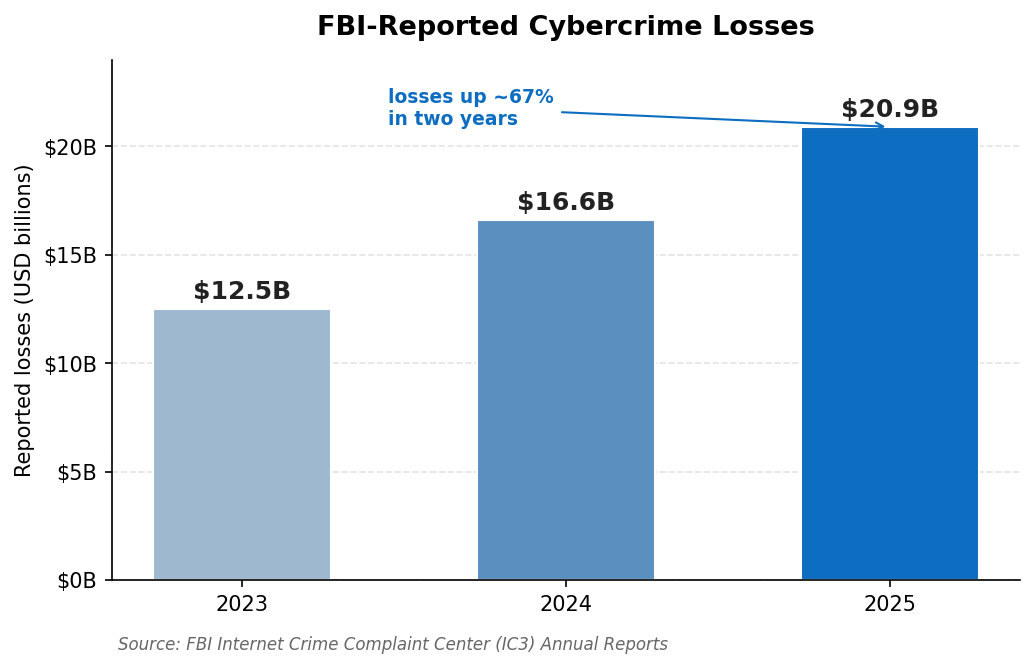
Because criminals frequently impersonate agents and title companies to divert closing funds, reported cybercrime losses tied to email and wire fraud now run into the billions each year. Any tool that touches client data should be chosen with that reality in mind.
How These Providers Were Ranked
Five standards shaped this ranking, each weighted for how real estate professionals actually work:
- Security: Strong encryption, multi-factor authentication, and protection against phishing attacks that target high-value transactions.
- Mobility: Reliable apps for phones and tablets, so you can work from a showing or while traveling.
- Ease of use: Simple setup and daily use for agents who are not technical and have no IT department.
- Performance: Smooth, high-resolution sessions for viewing property photos, floor plans, and media.
- Value: Pricing that suits an independent agent or a boutique brokerage, with no surprises.
Comparison at a Glance
| Provider | Platforms | Security | Best For |
|---|---|---|---|
| 1. Splashtop | Windows, Mac, Linux, iOS, Android | AES-256, MFA | Most agents and teams |
| 2. RealVNC Connect | Cross-platform | Encrypted, MFA | Mixed-device users |
| 3. AnyViewer | Windows, mobile viewer | Encrypted sessions | Simple Windows access |
| 4. RemotePC | Windows, Mac, Linux, web | AES-256, 2FA | Small teams without IT |
| 5. TsPlus | Self-hosted, web | TLS | Brokerages self-hosting |
The 5 Leading Remote Access Providers for Real Estate in 2026
1. Splashtop – Secure, Mobile Access Built for Agents on the Move
Splashtop lets real estate professionals reach their office computer, CRM, and transaction files from anywhere, on any device, with security that holds up to sensitive client data. Every session is protected with TLS and 256-bit AES encryption, multi-factor authentication, and device verification, the same protection used to guard financial information. Polished apps for iOS and Android make it easy to pull a document mid-showing, and sessions stream at up to 4K with low latency, so high-resolution photos and floor plans look sharp rather than blurry. It runs across Windows, Mac, Linux, and mobile devices, sets up in minutes without IT help, and stays affordable for small teams. More than 30 million users rely on Splashtop, including 85% of the Fortune 500.
For agents and brokers comparing the leading remote access software providers ranked in this guide, Splashtop is the most balanced choice, and a free trial is available on Splashtop’s site.
“This has significantly increased my earning potential while drastically reducing travel costs and time to resolution.” Frank M., Owner, G2 (Splashtop Remote Access holds 4.8/5 from 500+ reviews)
Pros:
- Bank-grade AES-256 encryption with MFA
- Excellent iOS and Android apps for on-the-go access
- 4K, low-latency sessions for property media
- Affordable and simple for non-technical teams
Cons:
- Not a document-signing or transaction platform
- Advanced admin controls suit larger teams more than solo agents
Best for: Agents and brokerages that want secure, mobile access to their work computer.
Contact: Website: https://www.splashtop.com HQ: Cupertino, California, USA
2. RealVNC Connect – Reliable Access Across Mixed Devices
RealVNC Connect is a long-established remote access platform that works smoothly across a mix of Windows, Mac, and Linux machines, which suits agents who pair a desktop at the office with a laptop and phone on the road. It offers encrypted sessions, MFA, and both cloud and direct connection options, plus mobile apps for quick access between appointments. For professionals who value a proven, stable tool, its track record is reassuring.
Pros:
- Stable, well-established platform
- Encrypted sessions with MFA
- Cloud and direct connection options
Cons:
- Interface feels more utilitarian than modern
- Pricing tiers can be confusing at first
Best for: Agents working across several different devices and operating systems.
Contact: Website: https://www.realvnc.com
3. AnyViewer – Simple Windows Access With a Free Tier
AnyViewer is a straightforward remote access tool built mainly for Windows, with a free tier that makes it easy to try before committing. It offers encrypted sessions, fast file transfer, and one-click connection to assigned devices, plus mobile viewer apps for iOS and Android. For an agent who works primarily on Windows and wants something simple to set up, it is an approachable entry point, though it is lighter on cross-platform depth than the tools above.
Pros:
- Free tier and budget-friendly paid plans
- Simple one-click connections
- Fast file transfer
Cons:
- Windows-centric, with limited Mac support
- Fewer enterprise-style controls
Best for: Solo agents who work mainly on Windows and want simplicity.
Contact: Website: https://www.anyviewer.com
A note on wire fraud: Real estate is one of the most heavily targeted industries for closing-related fraud, where criminals impersonate agents, lawyers, or title companies to redirect funds. Whichever provider you choose, insist on strong encryption and MFA, verify wire instructions by phone using a known number, and never act on payment changes received only by email.
4. RemotePC – Affordable, Browser-Friendly Access for Small Teams
RemotePC, from IDrive, is a cloud-based platform that connects to your computers from a web browser without installing anything, which is handy when you are borrowing a device or working from a client’s machine. Sessions are secured with TLS and AES-256 encryption, with a per-computer Personal Key and two-step verification for extra protection. Its Performance Viewer streams at up to 60fps for crisp media, and it runs across desktop and mobile platforms at a price that suits small teams without dedicated IT.
Pros:
- Browser-based access with no install required
- AES-256 encryption with two-step verification
- Affordable plans that scale with your team
Cons:
- Some advanced features are Windows-only
- Add-ons can raise the total cost
Best for: Small teams that want easy, secure access without IT overhead.
Contact: Website: https://www.remotepc.com
5. TsPlus – Self-Hosted Access for Brokerages
TsPlus takes a different approach, letting a brokerage publish Windows-based applications and desktops to its agents from its own server rather than a third-party cloud. Pricing is based on concurrent users rather than devices, and the self-hosted model keeps control of data in-house, which appeals to firms with specific compliance preferences. It is most at home in Windows environments and is geared more to a managed brokerage setup than to a solo agent.
Pros:
- Self-hosted for in-house control
- Per-user pricing that can scale economically
- Web-based access to Windows apps
Cons:
- Requires more setup than cloud tools
- Windows-centric and aimed at teams
Best for: Brokerages that prefer to host access on their own infrastructure.
Contact: Website: https://www.tsplus.net
Red Flags to Avoid
Not every remote access tool is safe to point at client and transaction data. Walk away when you see these warning signs:
- Weak or vague encryption: If a provider will not clearly state its encryption standard, do not trust it with closing documents.
- No multi-factor authentication: A password alone is not enough for data this sensitive.
- No real mobile apps: A tool you cannot use from a phone defeats the purpose for an agent on the move.
- Confusing per-device pricing: Costs that climb with every machine can punish a growing team.
- Sluggish performance: Laggy sessions make high-resolution property media painful to review.
Always run a short trial on your own devices and confirm a provider’s security claims against independent reviews before you commit.
FAQs
What should real estate professionals look for in remote access software?
Prioritize strong encryption and MFA to protect sensitive data, reliable mobile apps so you can work from showings, simple setup for a non-technical team, and smooth performance for property media. Value matters too, since most agents do not want enterprise-level pricing.
Is remote access software secure enough for client and transaction data?
The leading tools use the strong encryption that protects financial information, and when paired with MFA they are well suited to sensitive data. Security also depends on good habits: use unique passwords, enable MFA, and verify any wire or payment instructions through a trusted channel rather than email.
Can I access my office computer from my phone while showing properties?
Yes. Tools like Splashtop offer polished mobile apps that let you reach your office computer, open documents, and check your CRM from a phone or tablet, ideal when a client asks a question during a showing.
Why does Splashtop rank first for real estate professionals?
Splashtop combines AES-256 encryption and MFA with strong mobile apps, fast 4K sessions for property media, simple setup, and small-team pricing. That balance of security, mobility, and value fits how agents actually work.
Does Splashtop work across Mac, Windows, and mobile devices?
Yes. It runs on all major desktop and mobile platforms, so you can reach your office computer from almost anywhere, whether at your desk, at a listing, or traveling.
The Bottom Line
Among these leading remote access software providers ranked for luxury real estate professionals, Splashtop stands out by delivering secure, mobile, high-performance access to your work computer at a price that suits agents and boutique brokerages. RealVNC Connect is reliable across mixed devices, AnyViewer keeps Windows access simple, RemotePC offers browser-based ease for small teams, and TsPlus suits brokerages that want to self-host. Ready to choose? Start a free Splashtop trial, test it from your phone at your next showing, and confirm its security against your firm’s standards.