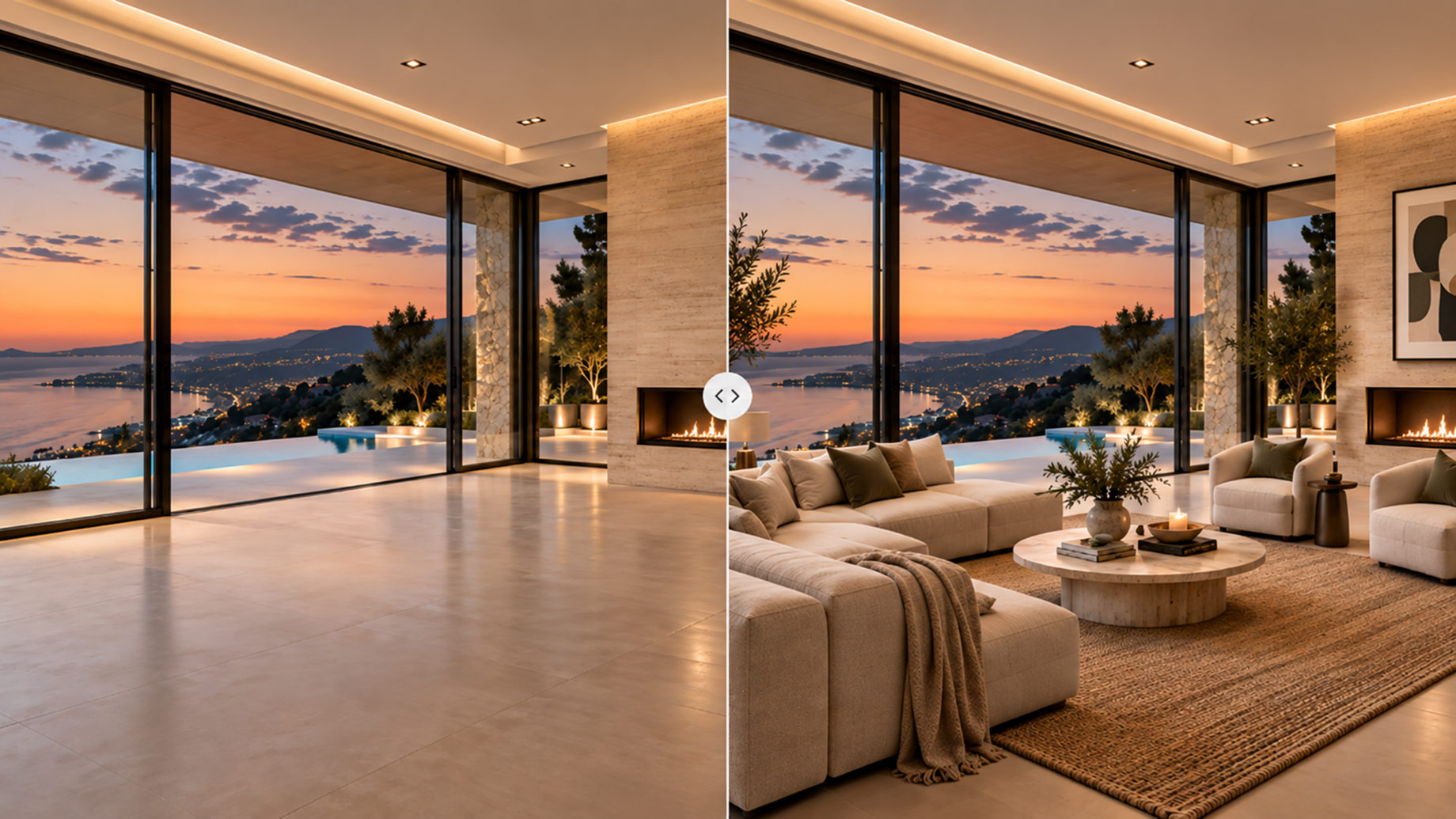
A twilight conversion of a hillside estate looks like a routine campaign task. The lawn turns emerald, the pool lights glow, and the sky becomes an eight-minute sunset. Somewhere in the same pass, the upper terrace railing gains a glass panel that was never installed, and the neighbor’s roof slides out of frame. Nobody asked for either change. The buyer who flies in for a private showing is the first person to notice.
Generative editing has made this failure cheap and quiet. Tools such as Nano Banana Pro can swap a sofa, relight a room, or extend a frame in seconds, which is exactly why luxury teams need a written ladder that says which edits are documentation, which are staging, and which are ideas. The ladder is not a restriction on creativity. It is what allows creativity to run without a legal conversation on every export.
Three Tiers, Three Different Promises
Every listing image makes a promise about what exists. The tier of the edit determines how much of that promise survives.
- Tier 1 – Corrective. Anything a lens, a tripod, or a photo lab could have done: color cast, converging verticals, dust, cables, a recycling bin, a lens flare. The rule is simple. The edit adds no information about the property that the camera did not already record.
- Tier 2 – Staging. Reversible layers: furniture, art, textiles, plants, table settings, sky and time of day. Every added object must be removable in real life without a contractor. Staging is legitimate when the audience is told it is staging.
- Tier 3 – Concept. Anything that has not been built: a proposed pool, a kitchen scheme, a landscape plan, an extended terrace. Concept imagery can be the most persuasive asset in a pre-construction campaign. It is also the tier most likely to be mistaken for a photograph.
| Tier | Typical edits | What the buyer will infer | Disclosure | Stops immediately when |
|---|---|---|---|---|
| Corrective | White balance, straightening, debris removal, minor flare | “This is what the camera saw.” | None | A fixed element is removed, moved, or resized |
| Staging | Furniture, art, plants, sky replacement, twilight | “The room exists; the furnishing may not.” | “Virtually staged” beside the image | Fixed finishes, openings, or views change |
| Concept | Renovation, addition, landscape scheme, outpainted frame | “This is a proposal.” | “Proposed concept” plus a current-condition photo in the same set | It is published without its unedited counterpart |
Most disputes come from Tier 2 work that quietly performs a Tier 3 change. The sofa was the job; the wall behind it moved.
The Six Traits That Stay Frozen at Every Tier
Before any prompt is written, record the permanent traits from the source photographs and floor plan. Keep the list short enough to check in under a minute.
- Counts – windows, doors, skylights, columns, steps, balusters.
- Openings – position and width of every doorway, arch, and window bay.
- Dimensions – ceiling height, room proportion, terrace depth, pool length.
- Fixed finishes – stone species, timber grain, tile pattern, metal color, cabinetry lines.
- Views – what is actually visible through glass, from that camera position, at that focal length.
- Context – neighboring structures, lot lines, roads, slopes, tree cover on adjacent land.
Nothing on this list may change at any tier without moving the asset into Tier 3 and labeling it. A prompt that improves the twilight but replaces the travertine with limestone has failed even if the result is beautiful.
Match the Model to the Tier
Not every edit needs the heaviest tool, and heavier tools are not automatically safer. The practical split most luxury teams settle on:
| Task | Better fit | Why |
|---|---|---|
| Single-object swap, sky replacement, quick iteration on a loose layer | Nano Banana | Fast turnarounds make it easy to run five variants and compare them against the control frame |
| Same furniture scheme carried across an entire floor | Nano Banana Pro | Multiple reference images keep the sofa, rug, and art consistent from room to room |
| Print brochure hero, large-format hoarding, high-end portal placements | Nano Banana Pro | High-resolution output holds up when a reviewer zooms into seams and material edges |
| Text on signage, brochure covers, labeled concept boards | Nano Banana Pro | Legible in-image text avoids the misspelled street sign that ends up in a screenshot |
| Extending a frame for a banner crop | Either, only with overlapping source frames | The model choice matters less than whether evidence exists for the missing area |
Nano Banana Pro earns its place on the campaign side of the ladder, where consistency and resolution matter and where the output will be examined at close range. The lighter model earns its place on the iteration side, where speed is what lets a reviewer reject an edit without losing an afternoon.

Write the Prompt Like a Change Order
A contractor’s change order names what changes, what stays, and what the reference is. A listing-photo prompt should read the same way. Vague prompts invite the model to improve things it was never asked to touch.
| Weak prompt | Change-order prompt |
|---|---|
| “Make this living room look more luxurious and inviting.” | “Replace the two loose armchairs with the mid-century pair from reference image 2. Keep the fireplace stone, floor material, window count, ceiling beams, wall color, and the exterior view unchanged. Do not alter the camera position.” |
| “Twilight version, warm and glowing.” | “Convert the sky to early twilight and turn on the existing interior and pool lights. Keep the roofline, the number and position of windows, the lawn edge, the neighboring roof at left, and the driveway unchanged.” |
| “Extend this image to 16:9 for the website banner.” | “Extend the frame left and right using reference frames 3 and 4 for the terrace and garden wall. Add only sky and continuous lawn beyond the wall. Do not add trees, structures, or a view that is not in the references.” |
Two habits raise the pass rate more than any other. Name the frozen traits explicitly in every prompt, even when the task feels harmless. And give each generation one job; a prompt that stages the furniture and changes the sky and extends the frame is three edits with one place to hide a mistake.
The Two-Minute Review Before Anything Ships
Reviewing against memory does not work. Review against the geometry control, the straightest source frame with the fewest lens artifacts.
- Overlay at 50% opacity. Any drift in a mullion, roof edge, stair width, or pool corner appears immediately.
- Count, do not glance. Windows, doors, balusters, pendant lights. Generative models are fluent at adding one more of anything.
- Check reflections and glass. The view in a window, mirror, or pool surface should match the view outside the frame.
- Zoom on material transitions. Stone-to-timber, tile-to-wall, and countertop edges are where finishes get silently rewritten.
- Read every letter. House numbers, signage, book spines, brochure text.
- Rerun the whole check after a repair. A local fix on one seam can shift a region the reviewer already approved.
Log each finding as either a repairable local error or a disqualifying permanent-trait change. Only the file that passes the full list is the approved export.
Disclosure Language That Survives Portals and Social Crops
Disclosure fails when it lives on a separate page. Portals strip captions, and social crops strip everything. Put the label where the image is seen and keep it plain.
- Staging: “Virtually staged. Furniture and décor shown are not included.”
- Twilight and atmosphere: “Twilight enhanced. Structure and views as photographed.”
- Concept: “Proposed concept. See current-condition photograph in this set.”
- Extended frame: “Promotional composition. Extended area does not represent additional land or structures.”
Keep the unedited photograph in the same gallery for every Tier 2 and Tier 3 asset. The comparison does not weaken the campaign; it is what lets a buyer enjoy the concept without wondering what else moved.
Reject the Frame, Not the Tool
The ladder makes one decision easy. When the most beautiful output changes a permanent trait, reject it. Choose another crop, shoot another frame, or publish the idea as a labeled concept beside the real room. Generative editing gives luxury teams speed, consistency, and reach they did not have two years ago. What it cannot supply is the one thing a luxury buyer is paying for at the showing: the confidence that the house in the photograph is the house at the end of the drive.