Let me put the conclusion up top. If what you make involves the same character showing up over and over — short dramas, product ad series, creator-led brand content, virtual influencers — this one’s worth your time. If you’re making the occasional one-off cinematic flex piece, skip it. Luma is better for that.
Alright, here’s three weeks of actual use.
I started testing DramaPixel somewhere around mid-September. I meant to have this review out before the end of the month. Didn’t happen. Part of the reason was that I changed my testing plan halfway through — I originally only planned to run it on a short drama project, but a few days in I decided one use case wasn’t a fair test and added two more. A small ad shoot for my friend Mia’s indie skincare brand, and a fashion lookbook I did for fun.
Three projects, three weeks. Everything below actually happened during that stretch.
I’ve reviewed a lot of AI video tools at this point. Most get uninstalled within a week. The ones that stay in my bookmarks bar are rare. Finding an AI video generator that can actually carry a real production workflow is harder than you’d think.
So what is it, exactly
Short version: a browser-based platform that handles image, video, and audio in one place, built around the problem of “same character or same product appearing across many shots.” That last part is the whole pitch.
Under the hood it routes between several current video models — Seedance, Veo, Kling, Wan-class. You pick which one to use per shot. More on this later because it ended up being the feature I used most.
Looking at how the UI is laid out, it’s pretty clear who it’s built for: short-drama creators, performance marketers, fashion and beauty content teams, small studios shipping work weekly. Not built for one-off hero shots. Not built for 500-person enterprises either.
Signup and first impressions
Took about thirty seconds. Google login, free credits land in your account immediately, no card required. That’s a plus — there’s still a surprising number of tools that won’t let you generate anything until you cough up a credit card.
The dashboard was cleaner than I expected. A single left-side nav with image, video, and audio. Recent projects on the home screen. None of that “the feature you need is buried three menus deep” thing.
First thing I did was generate a character portrait, just to see. Plain text-to-image. Came out fine. Nothing special.
But I noticed pretty quickly that the tool kept nudging me toward uploading reference images instead of writing longer prompts.
That’s a different way of thinking.
Most AI tools expect you to describe who someone is in text. DramaPixel expects you to show it a picture and then tell it in text what that person should do.
If you’ve ever written an increasingly elaborate prompt trying to get the same face twice, you’ll get why that matters.
The feature I used most: image combiner
Honestly, most of my time was in the AI image combiner.
The idea is simple. Upload a few reference images, it fuses them into one coherent frame. For me that was usually a character shot, an outfit shot, and a background. Sometimes a prop.
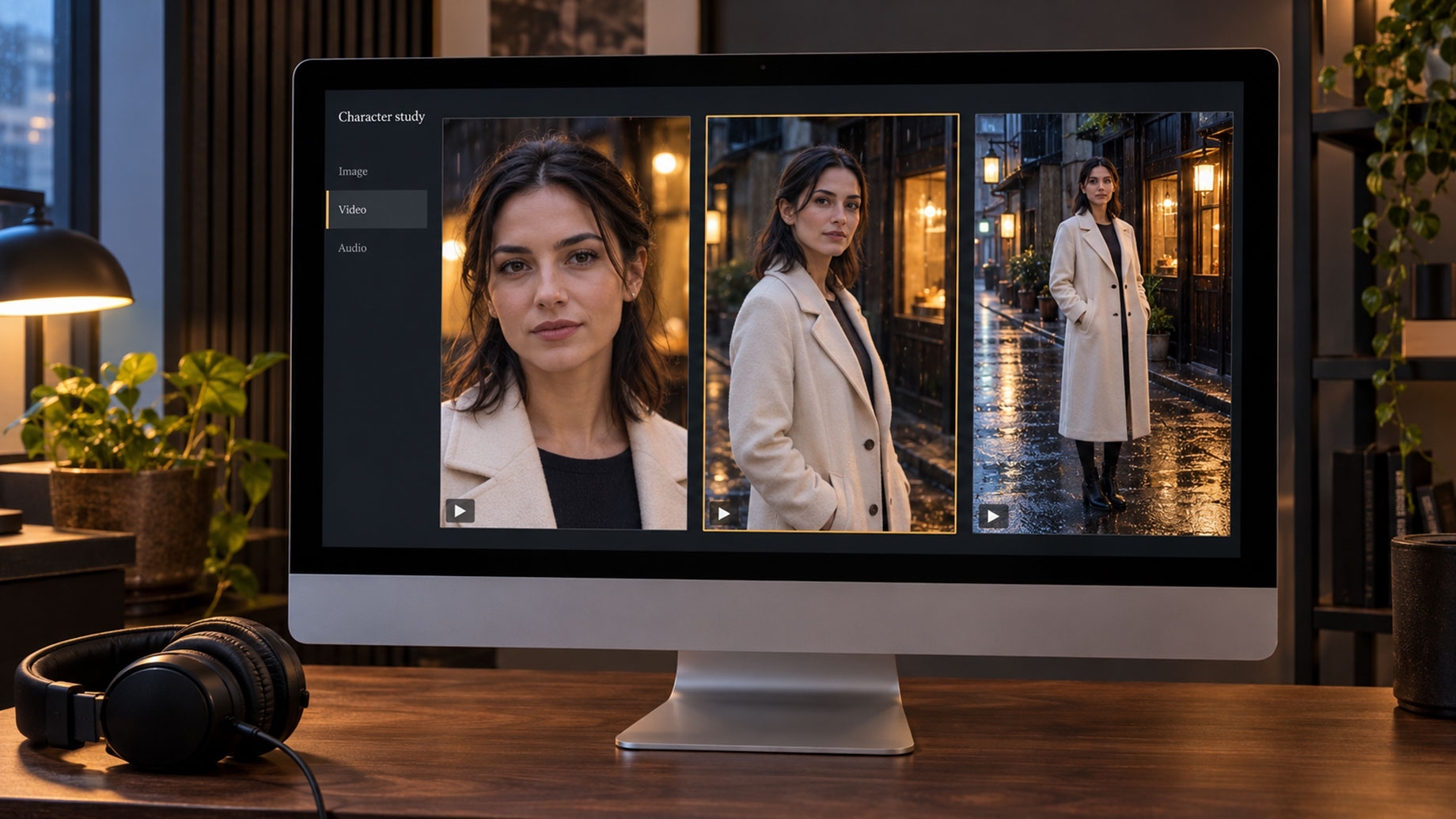
Concrete example. In the drama project there’s a scene where the lead — woman, thirties — is standing on a rainy backstreet in Tokyo wearing a cream wool coat. Three elements, three different sources. The character was from a reference set I’d built earlier. The coat was literally a product photo I’d screenshotted off a shopping site. The background was a night-scene photo I found online.
Uploaded all three, wrote a short prompt, hit generate.
First version was off. The coat came out more beige than cream. I nudged up the weighting on the outfit reference, regenerated, and the second version was there.
The “second version was there” part is what matters to me. I’ve done the same thing on other tools and been on version five still not getting it right.
Across all six episodes, the lead’s face stays recognizably the same person. Not 100 percent — there’s still drift on side profiles and backlit shots — but noticeably better than anything else I’ve used.
A few things I learned the hard way
Character references work best when the photo is well-lit and roughly facing camera. Side profiles and heavy shadows cause more drift later. Not a DramaPixel-specific thing, it’s a general limitation of current image models. But new users will trip on it, so, flagging it.
Product references held up better than I expected. Mia’s skincare bottle ran through maybe thirty generations across different lifestyle backgrounds, and the label stayed legible on almost all of them. Three or four had warping — one regen fixed it.
Four-reference composites are around where it starts to struggle. Three is reliable. Four works but takes iterations. Five I didn’t bother. No point fighting the tool.
The video side
The per-shot model selection thing — I didn’t appreciate it until later.
First couple days I just defaulted to the premium model (Veo-class) for everything. Burned through credits fast. Then I started doing this instead:
- Important shots — emotional close-ups, key reactions, scene openers — premium model
- Connecting shots, transitions, coverage — cheaper model
Across the three projects, roughly a 40% cut in total credit spend compared to going premium on everything. That’s a rough number, I didn’t measure precisely, but the difference was obvious.
Means a monthly subscription lasts the whole month if you’re smart about it. Or dies around week three if you’re not.
How’s the motion
Walking, turning, basic gestures — fine. The premium model does these cleanly.
Fight choreography, dancing with specific moves — same AI limitations as everywhere else, still a lot of rerolls.
Camera moves are the usual set: push in, pull out, pan, orbit, static. Nothing fancy. If you want more cinematic camera work, Luma is still ahead on that specifically.
Clip length
Caps out around 8–10 seconds depending on model. For longer sequences you use the stitching feature to chain clips together.
Works, but transitions between stitched clips are where little inconsistencies show up — lighting shifts slightly, background drifts a touch. Experienced editors will cut around these points. New users will probably get annoyed.
Audio — didn’t spend much time here
AI voice, background music, SFX, voice cloning, all built in. Quality’s OK. Not blown-away OK, but OK.
For the drama I used the native voice for first drafts and swapped to ElevenLabs for the final character voices. For the ad project I shipped with the native audio and it was fine.
Not the strongest in category. But having it in the same workspace saves a lot of tab-switching, which is worth something.
Does the pricing make sense
Credit-based. Free credits on signup, pay-as-you-go credit packs, monthly subscription for heavier use.
After three projects, my rough math:
The drama was heavy — six episodes, around 180 shots total — monthly subscription made sense. The ad project was twelve variants, credit pack covered it. The lookbook was mostly image-combiner work, 24 shots, free credits plus a small pack and I was done.
Credit packs don’t expire monthly. That matters a lot if your output is uneven, which mine is. Some weeks I’m writing. Some weeks I’m doing three projects. Flat monthly subscriptions always made me feel like I was paying for air half the time.
If you’re producing daily, the subscription tiers are priced in the middle of the pack. Not the cheapest. Not the most expensive.
What I’d actually say is this: the real cost per finished shot came out lower than most competitors in my testing. Not because the per-credit price is cheaper. Because fewer generations were wasted. Once you lock the reference, the number of regens drops hard. Wasted generations are the real cost of AI video. That’s the lever.
What I liked
The reference-first workflow changed how I set up projects. I used to open a tool and start typing. Now I spend twenty minutes prepping reference images before touching the generator. Twenty minutes up front, dozens of failed generations avoided downstream.
Per-shot model selection sounds like a technical detail. It saves real money.
Image, video, and audio in one workspace. Sounds minor, isn’t. Anyone who’s shipped a project knows how much friction tab-switching adds.
Vertical 9:16 is treated as a first-class format. Not a horizontal video cropped. Some competitors still fumble this, which is a little ridiculous in 2026.
Free credits are enough to actually complete a real project. I shipped the lookbook without paying anything. That kind of trial is rare.
What’s not great
Template library is thin compared to Canva. If you’re template-driven, this feels like a step down. I don’t use templates much so it didn’t bother me, but it’s a real gap.
Model selection has a learning curve. First week I had no idea which model to use for what and just burned credits. Docs could cover this better. Right now you have to figure it out through trial and error.
Peak-hour queues. Weekday afternoons, roughly 3–4pm, generation visibly slows. Not a dealbreaker. Factor it in if you’re on a deadline.
Enterprise features are weak. If you need SSO, granular permissions, elaborate approval flows — this isn’t your tool. Small teams are fine. Big orgs will hit walls.
Documentation is thin. Core features are intuitive enough. Power-user stuff is mostly figured out by poking at it. Some of that poking is fun. Some of it is time I’d rather not have spent.
Who should actually use it
After three weeks, these are the people I’d recommend it to:
Short-drama creators. Especially vertical serialized stuff. The consistency features exist for exactly this.
Performance marketers. If you’re pushing out ten or twelve ad variants a week for the same product, variant production on this tool is genuinely cheap.
Fashion, beauty, and lifestyle content teams. Same model wearing ten outfits, same product in ten scenes — this is the smoothest workflow I’ve seen for it.
Freelancers and small studios. Uneven workload? Credit model wins over flat subscriptions.
Anyone traumatized by character drift. If “character drift” makes you sigh out loud, you already know what I mean.
Less essential for: people shipping single hero shots (use Luma), people doing talking-head avatar content (use HeyGen), people doing social-template design (Canva is cheaper).
Head to head with the main alternatives
- vs. Luma. Luma is more cinematic per shot. DramaPixel is more consistent across a project. Different problems.
- vs. Vidu. Both strong on character consistency. DramaPixel has the edge on multi-reference composites. Vidu is stronger on stylized / anime output.
- vs. HeyGen. Not really competing. HeyGen owns talking-head avatars. DramaPixel owns scene-based narrative.
- vs. Canva. Also not direct competitors. Canva is design-first with AI tacked on. DramaPixel is AI-first.
- vs. Flova. Flova is more automated, more agent-driven. DramaPixel gives you more direct control. Depends on whether you want to steer or sit back.
Wrap
Three weeks in. DramaPixel is now in my regular workflow. Not for everything — I still open Luma for occasional hero shots and ElevenLabs for final voice — but anytime a project involves “same person across many shots” or “same product across many scenes,” this is what I open.
It’s not perfect. Docs need work. Enterprise features need work. Template library needs work.
But the thing it’s built to do — reference-driven, high-consistency, batch-produced content, at a cost that actually works — I haven’t found many tools doing it better right now.
If your work involves serialized content, ad variants, or anything where one subject needs to appear across a lot of frames, give it an hour. Sign up, upload a reference, run your first project. The free credits are enough to tell you if it’s for you.
My rating: 4.5 / 5.
Half point off for thin docs, weak enterprise features, and the learning curve on model picking. Nothing else really bothered me.