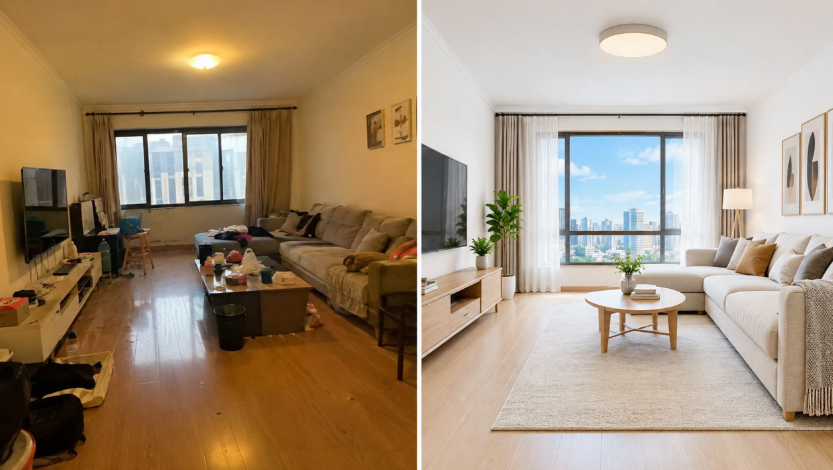
81% of online buyers rate listing photos as very useful, and that’s why weak images lose the click before a showing is ever booked. If you want more attention, treat real estate photo enhancement as a 12-edit production checklist, not a one-off retouch.
Your listing photos are competing on a phone screen, in a crowded search feed, against other homes that already look clean, bright, and easy to understand. That’s the game. Buyers are filtering fast, they’re scanning visuals first, and if the first image looks dark, crooked, or cluttered, they move on.
Table of Contents
- Why Listing Photos Decide the Click
- The three layers that matter
- Edits 1 to 4 The Foundation Layer
- 1 Exposure correction
- 2 White balance
- 3 Vertical-line correction
- 4 Deliberate crop
- Edits 5 to 8 Defect Correction and Sky HDR
- 5 Declutter
- 6 Furniture removal or virtual emptying
- 7 Sky replacement
- 8 HDR exposure blending
- Edits 9 to 12 Click Conversion Finishes
- 9 Output sharpening
- 10 Twilight conversion
- 11 Virtual staging
- 12 Hero image selection
- One Photo Through All 12 Edits A Worked Walkthrough
- Why the order matters
- Cost Time and the AI Workflow
- Disclosure Safe Enhancement The Competitive Edge
- What to preserve
Why Listing Photos Decide the Click

A listing goes live with raw photos, and the problem starts immediately. Buyers open the gallery before they read the description, and the strongest image usually earns the next tap. The National Association of REALTORS’ digital-age report showed that 44% of buyers looked online first, 87% rated property photos as very useful, and the typical buyer used a mobile device to search, which makes small-screen readability a real issue.
The eye-tracking research backs that up. Participants spent more than 95% of their observed attention on visual elements rather than descriptive or statistical information, so the first job of editing is clarity; drama comes later, if at all. Good editing makes the room readable at a glance, and that is what gets the click.
The three layers that matter
Practical rule: fix the foundation first, then remove defects, then add the finishing edits that convert a glance into a click.
The checklist works in three tiers. Foundation corrections make the photo technically usable. Defect corrections remove the details that push buyers to keep scrolling. Click-conversion finishes sharpen the hero image, stage empty rooms, and choose the lead photo that works best in the feed.
The 2025 buyer survey keeps the pressure on photo quality, too. 81% of online buyers rated listing photos very useful, ahead of detailed property information at 77% and floor plans at 57%, and a separate NAR-based summary said 52% of buyers found the home they purchased online. The gallery is not decoration. It is the first sales conversation.
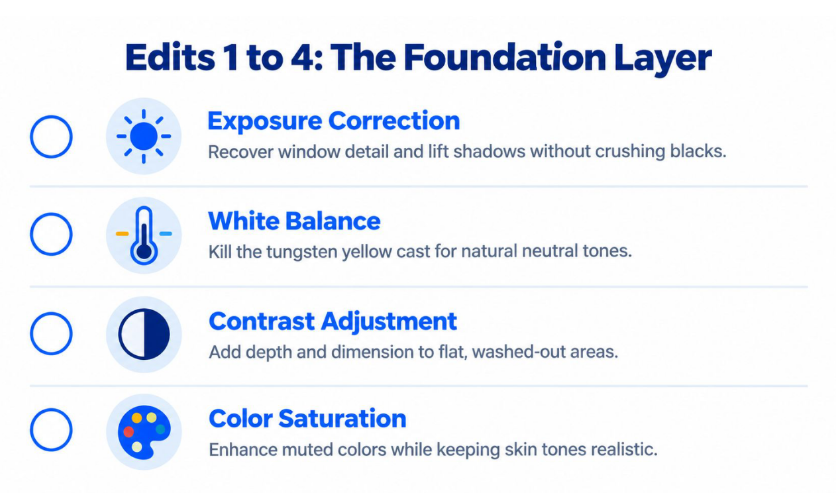
Edits 1 to 4 The Foundation Layer
Start with the base layer or don’t bother editing at all. If the photo can’t hold up on a thumbnail, every fancy move after that is wasted time. The first four edits are about making the room truthful, readable, and properly framed.
1 Exposure correction
Fix the window first. Then lift the shadows enough to read the room without crushing the blacks or clipping the highlights. If you can’t see outside detail and interior detail in the same frame, the image is still underdone.
Practical rule: clip highlights before you clip shadows, because blown windows are harder to forgive than slightly deep corners.
2 White balance
Kill the orange tungsten cast from builder-grade bulbs and agent-installed lamps. White walls should look neutral, not beige from color contamination. If the room still feels warm after correction, that’s fine. If it looks yellow, you’ve gone too far.
3 Vertical-line correction
Wide-angle lenses bend truth faster than any other mistake. Straighten verticals until walls, door frames, and cabinets read as upright, but don’t stretch the room into something it isn’t. Keep verticals within roughly 1 degree of true, and stop there. More correction often starts to deform the architecture.
4 Deliberate crop
Crop for the feed, not your ego. The hero frame needs to work at thumbnail size and sit comfortably in a 16:9 MLS-style presentation. Cut dead ceiling, awkward floor, and anything that doesn’t help a buyer understand the room. If the crop weakens the doorway, window line, or the main seating area, it’s the wrong crop.
Use the corrected file as the master and build from there. If you want a production tool that bundles this kind of work, the real estate photo enhancement workflow at real estate photo enhancement is the point where the image stops being raw and starts being listing-ready.
Edits 5 to 8 Defect Correction and Sky HDR
This is the middle of the job, where most listings either get cleaned up or get ignored. These edits remove the visual junk that makes buyers feel the home needs work, and they fix lighting problems that make rooms feel smaller than they are.
5 Declutter
Clear counters, fridge magnets, toy piles, cords, pet bowls, and the random objects that make a room feel busy. Don’t wipe the room sterile. Keep enough life in the frame that the space still feels inhabited. The point is to remove friction, not personality.
6 Furniture removal or virtual emptying
If a listing is vacant, emptying the frame can help the buyer understand scale and potential. If the room is packed with leftover furniture from a tenant or a seller in transition, remove what blocks the floor plan from reading cleanly. This is also where virtual staging starts making sense, because buyers struggle to interpret bare or awkward rooms.
7 Sky replacement
Exterior photos live or die on the first glance. A dull gray sky drains energy from a listing, and a blown-out sky makes the whole front elevation look flat. Replace the sky when it supports the house, but keep it believable for the region and the season. If the sky looks pasted on, you’ve helped the click and hurt the trust.
8 HDR exposure blending
Use HDR when the room has a bright window and dark corners that can’t be balanced in one exposure. Mixed lighting, backlit interiors, and high-contrast living rooms are the classic cases. If the scene is only mildly uneven, a single exposure with controlled relighting is faster and often cleaner. Save full bracketed HDR for the rooms that require it.
Do the least aggressive fix that makes the room readable. Buyers reward clarity, not special effects.
The practical cutoff is simple. If the defect changes how quickly a buyer understands the room, it needs fixing. If it only changes how polished the room feels, it’s lower priority than exposure, clutter, and perspective.
Edits 9 to 12 Click Conversion Finishes
The final layer is where a good photo becomes a better click magnet. These edits don’t rescue bad capture, and they shouldn’t try to. They refine the image so the feed shot, the staging shot, and the hero image all pull their weight.
9 Output sharpening
Sharpen for the web, not for print. Keep the radius in the neighborhood of 0.8 to 1.2, and set the threshold above the noise floor so you’re sharpening edges, not grain. If railings, cabinet lines, and trim start to sparkle or halo, back off. Over-sharpened MLS photos look cheap fast.
10 Twilight conversion
Use dusk conversion selectively on exteriors that benefit from warm interior glow and a more premium first impression. Don’t slap it on every house. A well-converted twilight shot can be a strong hero image, but only if the original exterior shape still reads naturally.
11 Virtual staging
Empty rooms gain readability through staging. The NAR staging survey found that 83% of buyers’ agents said staging made it easier for buyers to visualize a property as their future home, and the most commonly staged rooms were the living room at 91%, primary bedroom at 83%, and dining room at 69%. Focus your staging credits there first, rather than in low-impact spaces.
12 Hero image selection
Choose the one photo that earns the click. Usually it’s the front exterior, but sometimes it’s the kitchen, the view, or a twilight shot that has the strongest feed presence. The cover image needs to be bright, straight, and instantly understandable. If a buyer has to think about what they’re seeing, you’ve already lost a chunk of attention.
Label staged or altered images clearly before publication. If the image is virtually staged, decluttered, or has a major sky replacement, the disclosure should travel with the file set, not sit in a notes folder nobody opens.
One Photo Through All 12 Edits A Worked Walkthrough
Take a typical empty living room shot. It has a bright window, a tungsten ceiling fixture, clutter on the counter, and walls that lean because the camera was held a little low. That’s not a bad room. It’s just a raw file that needs order.
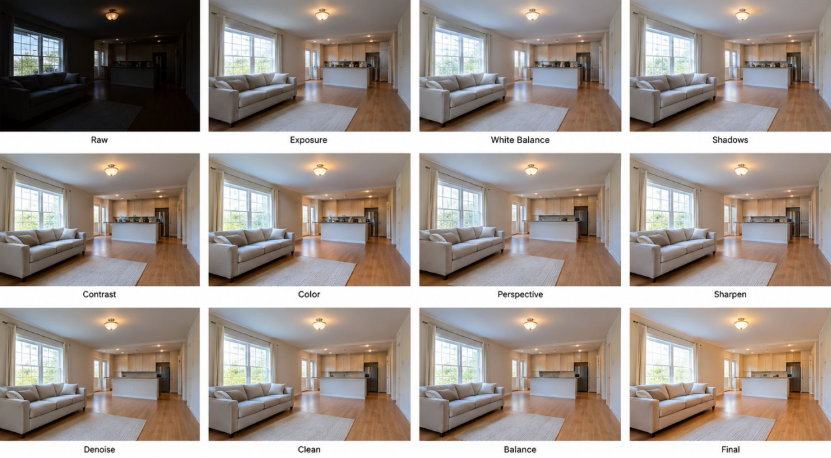
First, exposure comes up until the seating area reads properly. Then white balance removes the amber cast from the ceiling fixture so the walls don’t look tired. Once the color is neutral, the clutter is easier to spot and remove because the eye isn’t distracted by the wrong tone.
Why the order matters
The sequence matters because each correction changes the next decision. A cluttered room shot in warm light often looks messier than it really is, so if you remove clutter before fixing color, you may leave obvious problems sitting in the frame. Correct the light first, then clean the scene, then add the finishing edits.
After that, straighten the verticals, crop for the hero frame, and decide whether the room needs HDR or a lighter relight. In a low-contrast room, AI relighting can be enough. In a high-contrast shot with a bright window and dark corners, real HDR brackets are the safer move.
If the room still feels hard to read after exposure and white balance, the issue is usually contrast, not decoration.
Once the technical layer is stable, sharpening gives the image enough crispness for mobile. If the room is empty and hard to judge, virtual staging helps the buyer understand scale. The final choice is the cover image, because that single frame determines whether the listing gets the next tap.
Cost Time and the AI Workflow
Manual editing still works, but it is slow. For batch listing work, a working photographer can spend roughly 10 to 20 minutes per photo and charge about $2 to $5 per image for a comparable production flow. A credit-based AI workflow can bring the per-image cost down near $0.07 on higher-volume tiers, which changes the math on standard listings.
| Edit Tier | Manual Minutes | AI-Assisted Minutes | Manual Cost/Image | AI Cost/Image |
| Foundation layer | 4 to 6 | 1 to 2 | $2 to $5 | $0.07 to $0.20 |
| Defect correction | 3 to 6 | 1 to 2 | $2 to $5 | $0.07 to $0.20 |
| Click finishes | 3 to 8 | 1 to 2 | $2 to $5 | $0.07 to $0.20 |
| Full 12-edit listing set | 10 to 20 | 3 to 6 | $2 to $5 | Near $0.07 on higher tiers |
Speed is only half the benefit. The NAR staging survey found that 49% of sellers’ agents said staging reduced time on market, and 88% of sellers’ agents said listing photos were more or much more important to their clients. If the photo set looks better faster, the listing reaches market cleaner and sooner.
If you want a single-upload workflow that handles enhancement, declutter, sky replacement, and staging in one place, the platform at https://roomstaging.net/ is one option worth testing alongside your current process.
Disclosure Safe Enhancement The Competitive Edge
The dirty secret in listing photography is that a lot of altered images aren’t labeled. A recent compliance-oriented summary said nearly 11% of primary listing images on major portals showed evidence of digital alteration, and over 90% of those altered images had no visible disclosure. That’s not a minor edge case. It’s a workflow problem.
California’s AB 723, as summarized in real-estate advertising guidance, requires a statement on or next to an image when editing software or AI adds, removes, or changes elements, along with a link, URL, or QR code to the original image. CRMLS guidance also treats virtual staging as something that should be labeled and paired with the original immediately before or after it.
What to preserve
Keep the original file untouched. Label anything material, including virtual staging, furniture removal, decluttering that changes the room’s read, and major sky replacement. Then keep the disclosure record with the asset so it’s ready for the MLS, the broker file, and the audit trail.
That’s the edge. Transparent comparison beats invisible realism over the long run because buyers already rely heavily on photos. The goal isn’t to trick anyone into liking the image. It’s to make the image clear, accurate, and easy to compare.
If you’re building a repeatable photo pipeline, the smart move is to connect enhancement, staging, and disclosure in one system instead of fixing them separately after publication.