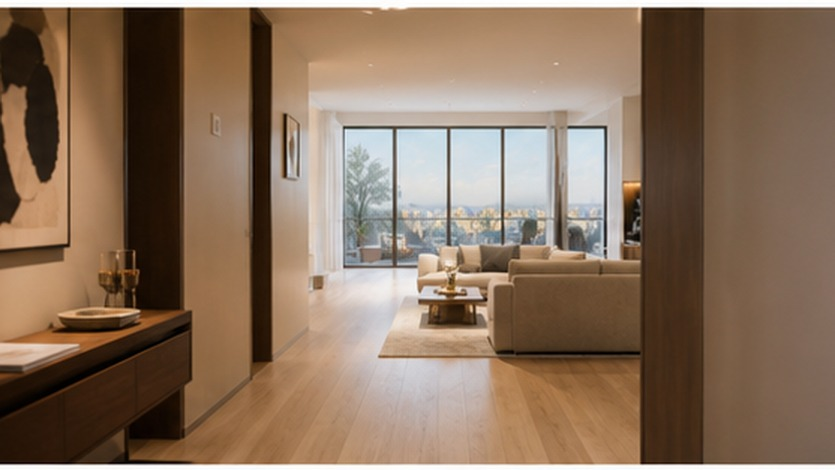
A room photograph captures finishes and furniture, but it can flatten the relationship between them. A viewer may see a sofa, doorway, and window without understanding which wall each one belongs to or how the room opens into the next space. Gentle motion can make an interior design video easier to read, but only if the generated clip respects the source photographs.
To turn room photos into a Seedance 2.5 interior showcase, begin with a clear wide view and a short camera move. Keep doors, windows, and furniture relationships anchored to the source photographs. The goal is a design presentation; verified photographs, plans, and measurements still establish property facts.
Organize photographs by viewpoint
Begin with a clear wide photograph that shows the main room and at least two fixed landmarks, such as a doorway and a window. Add compatible views only when they clarify areas outside the main frame. Label the files by direction or feature: “living room toward window,” “sofa wall,” and “door to dining area.”
Avoid combining photographs taken before and after furniture was rearranged. Check whether cushions, lamps, artwork, rugs, and doors match across the set. If one image uses a wide-angle lens and another is tightly cropped, do not assume the apparent proportions will align automatically.
Record the elements that must remain fixed:
- number and position of doors and windows;
- main wall openings and built-in features;
- relationship between major furniture pieces;
- floor and wall materials;
- visible lighting fixtures;
- approximate scale of the room.
Choose restrained camera movement
Interior showcase video benefits from slow movement that helps the eye understand depth. A gentle push from the entry toward the seating area, a short sideways slide revealing the window, or a controlled pan across a material detail can work well.
Avoid long, fast journeys through several rooms from a single photograph. The farther the camera travels beyond what the source material shows, the more likely the clip is to invent layout and surfaces. A small move within the photographed space is easier to compare with reality.
When using Seedance 2.5, state the landmarks that must stay in place. For example:
Use the living-room reference photographs. Keep the tall window on the left wall, the doorway to the dining area on the rear wall, the cream sofa facing the low oak cabinet, and the round rug centered between them. Begin near the room entrance at standing eye level. Move slowly forward and slightly right to reveal the depth between the sofa and window. Keep the daylight soft and the furniture stationary. End on a steady view that includes the window, sofa, and rear doorway.
This prompt treats the movement as a way to explain relationships rather than add spectacle.
Use detail shots without losing context
A design presentation may include close views of joinery, textiles, lighting, or material combinations. Establish the room first, then move to one detail at a time. A close-up of the sofa fabric means more when the viewer already knows where the sofa sits.
Keep detail shots visually connected to the wider room through color, light direction, and surrounding objects. Do not let a decorative close-up introduce a different wood tone, cushion pattern, or fixture design.
Check the generated room against the sources
Review the beginning, middle, and end of the camera move. Pause whenever an object enters or leaves the frame.
Ask:
- Does each door remain on the same wall and keep the same proportions?
- Do windows change size, divide into different panes, or move position?
- Does the sofa remain the same distance from nearby furniture?
- Does a table stretch, shrink, or gain extra legs?
- Do walls bend or open into spaces not shown in the photographs?
- Does the camera appear to pass through furniture?
- Do flooring lines and ceiling features remain stable?
A minor shift in a plant or cushion may be acceptable for a conceptual design montage. A changed doorway, invented window, or distorted furniture relationship makes the clip unsuitable as a realistic representation of the room.
Label the use appropriately
If the footage will be shown to a client, buyer, or public audience, describe it as a generated visualization or design presentation where appropriate. Do not present it as evidence of the property’s exact current condition. Pair it with verified still photographs and accurate project information.
The best interior showcase videos move slowly enough for viewers to understand the design. By limiting the camera path, protecting fixed architectural landmarks, and checking proportions carefully, a still room can gain a sense of depth without pretending to be a measured walkthrough.
Match the edit to the pace of looking around a real room. Let wide views remain long enough to understand the layout before cutting to materials. If every shot moves, the presentation can feel restless. A brief stable frame between camera moves gives the eye time to compare furniture, light, and architectural features.
Use the same room labels in filenames, prompts, and review notes so corrections can be traced to the right source photographs.