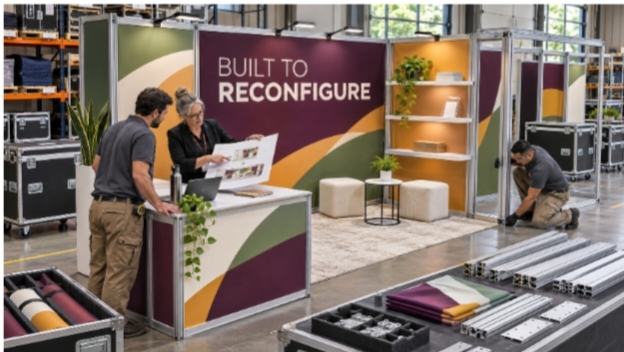
A modular booth system can be a practical investment when it matches the company’s event schedule, booth sizes, transportation needs, and available labor. The right system should work across multiple shows without creating new problems each time the layout changes.
However, the word “modular” does not always mean that every component can be reused in every configuration. Frame connections, graphic sizes, counters, shelves, lighting, and replacement parts may vary between systems.
Before buying, exhibit managers should look beyond the appearance of the assembled booth. They need to know how the system will be packed, shipped, installed, updated, and supported over several events. This guide covers the main points to check before placing an order.
Match the Booth System to Your Show Schedule
Begin with the company’s event calendar rather than a single booth design. Record the booth size, location, event frequency, shipping destination, setup rules, and expected graphic changes for each show.
A business that attends only 10×10 events has different needs from one that moves between 10×10 and 10×20 spaces. If the booth size changes throughout the year, confirm which frame sections and accessories can move between configurations. Ask whether the smaller setup uses the same components or requires a separate kit.
The number of events also affects the decision. A simple portable display may be enough for one or two shows. A more flexible modular system may offer better value when the booth will be used repeatedly.
What Exhibit Managers Evaluate Before Buying
A booth may look complete in a product photo while leaving important operational questions unanswered. Evaluate how the system performs before, during, and after the event.
Reconfiguration Across Booth Sizes
Ask the supplier to explain exactly how the system changes between booth sizes. A useful answer should identify which frames, graphics, connectors, counters, and accessories are reused.
Do not rely only on terms such as “expandable” or “reconfigurable.” Request dimensions or configuration drawings for each planned layout. This helps prevent a situation where the company owns a modular frame but must purchase most of the graphics again for a different footprint.
Also check whether the design stays balanced after components are removed. A 10×20 setup may look complete, while the reduced 10×10 version could lose an important graphic, storage area, or product display.
Setup Time and Labor Requirements
Setup affects labor costs, scheduling, and the risk of missing an event deadline. Confirm whether the booth uses push-button poles, numbered frame sections, tool-free connectors, tension fabric, silicone-edge graphics, or other installation methods.
Ask how many people are normally needed to assemble and pack the system. A lightweight booth may be manageable for one person, while a larger frame, overhead feature, or backlit wall may require a team.
Venue labor rules must also be checked. Some events allow exhibitors to install portable displays themselves, while others require approved labor for certain electrical, rigging, or construction work. The exhibitor manual is the best source for show-specific requirements.
Setup instructions, labeled parts, and packing diagrams can reduce mistakes when different employees handle the booth at each event.
Shipping and Storage Needs
A modular booth should be evaluated in its packed form as well as its assembled form. Request the number of cases, packed dimensions, total shipment weight, and the weight of each case.
These details affect parcel shipping, freight costs, drayage, storage, and employee handling. A booth that saves money at purchase may cost more over time if it requires oversized freight or too many cases.
Check whether the cases protect the graphics, lights, frames, and small hardware separately. Replacement parts and tools should have assigned storage locations so they are easier to count after each event.
Businesses attending several shows should also consider where the booth will be stored between events and who will inspect it before the next shipment.
Graphics and Accessory Compatibility
Graphics are usually changed more often than the frame. Confirm which graphic types the system accepts and whether replacements can be ordered without buying new hardware.
Ask for the exact visible area, finished size, bleed, safe area, and finishing requirements for every panel. A frame model number alone may not provide enough information because similar systems can use different graphic dimensions.
The same review applies to accessories. Shelves, monitor mounts, counters, lights, literature holders, and storage sections must be compatible with the selected frame. Confirm any size or weight limits before ordering accessories separately.
If the company plans regular campaign updates, keep the approved templates, finished dimensions, and order details in a shared project record.
Structural Safety and Venue Rules
A display must be suitable for its intended environment. Confirm whether it is designed for indoor or outdoor use and follow the manufacturer’s setup instructions.
For indoor events, check the venue’s rules for booth height, fire safety documents, electrical equipment, accessible routes, and overhead structures. Larger displays may also require drawings or approval before the event.
Never assume that a general product description proves compliance with every venue. Requirements can differ by event, building, and location. Ask the show organizer which documents are required and verify that the supplier can provide applicable product information.
Outdoor use requires additional planning for wind, weather, anchoring, and surface conditions. A system intended for an indoor convention hall should not be placed outdoors unless the manufacturer specifically allows it.
Replacement Parts and Repeat Orders
Small missing parts can make a complete booth difficult to install. Before buying, ask whether connectors, frame sections, lights, power supplies, shelves, graphic panels, and carrying cases can be reordered separately.
The supplier should be able to identify the system through a product code, frame model, or previous order. Clear records help prevent incompatible replacement parts from being ordered later.
For repeat projects, save the approved proof, artwork version, color expectations, product specifications, and delivery details. Resellers and agencies should also confirm whether blind shipping is available when an order must go directly to an end customer.
How to Compare Total Cost Across Multiple Shows
Purchase price is only one part of the booth’s cost. A more useful comparison looks at the total cost across the expected number of events.
Include the initial hardware and graphics, replacement graphics, accessories, shipping, drayage, setup labor, storage, repairs, and replacement parts. Then divide the projected total by the number of planned shows.
For example, a lower-priced system may become expensive if it needs additional freight cases or cannot accept replacement graphics. A higher initial cost may be easier to justify when the same frame supports several campaigns and booth sizes.
Use realistic assumptions. Do not count future reuse unless the company already has a likely event schedule. Also account for branding changes, different show requirements, and possible damage.
The goal is not to find the lowest starting price. It is to choose a system that provides a predictable cost and workable process throughout the company’s event program.
What to Verify Before Placing an Order
Before approving the purchase, compare the supplier’s product information with the company’s event plan and artwork workflow.
Included and Optional Components
Confirm what the listed price includes. The product photo may show lights, counters, monitor mounts, shelves, cases, or furniture that are sold separately.
Request a clear component list and identify every optional item needed for the planned setup. Also confirm whether replacement graphics are available separately.
Assembled and Packed Dimensions
Review the full assembled width, height, and depth. Make sure the booth stays within the purchased exhibit space and does not block required aisles or neighboring booths.
Packed dimensions, shipment weight, and case count are equally important. Use them when estimating shipping, drayage, vehicle space, and storage requirements.
Artwork Templates and Graphic Areas
Obtain the correct artwork template before the design team prepares the files. Check the required color mode, resolution, bleed, safe area, panel order, and file format.
For multi-panel displays, important text and logos should not cross frame joints or fabric seams unless the template allows for them. Backlit graphics may also require different file preparation from standard fabric panels.
Submit professional, print-ready artwork that follows the supplier’s specifications. Production approval does not replace a careful review of names, contact details, dimensions, colors, or panel order.
Setup Instructions and Product Documentation
Ask for setup instructions or a video before the first event. This allows the team to estimate labor and identify unclear steps before the booth reaches the venue.
Keep the instructions, product codes, frame diagrams, and packing list with the display. A test setup before the first show can reveal missing parts, graphic alignment issues, or packing problems while there is still time to correct them.
Wholesale Trade Show Displays From 777Sign
Printing companies, sign shops, exhibit providers, and agencies can explore Wholesale Trade Show Displays from 777Sign for coordinated booth hardware and custom-printed graphics.
Available options support common event footprints and may include backwalls, counters, lighting, display accessories, and carrying solutions depending on the selected product. Buyers working with a standard 10-foot space can also review the available 10 ft trade show booth kits.
Before ordering, review the individual product page for the exact dimensions, included components, graphic areas, and production requirements. Product features can vary between booth kits.
777Sign focuses on production. Customers must provide professional, print-ready artwork based on the correct templates. This workflow is well suited to trade buyers who manage design and client approval before sending the project to production.
Registered customers can sign in or create a trade account to review available products and prepare for future orders.
Final Thoughts
A good modular booth system should fit more than one attractive layout. It should support the company’s show schedule, available labor, shipping process, graphic updates, storage space, and long-term budget.
Before ordering, verify which parts can be reused, what each configuration requires, and how replacement graphics and hardware are identified. Review assembled and packed dimensions, artwork templates, setup instructions, and applicable venue rules.
Clear product records are especially valuable for companies managing repeat events or client projects. They make future graphic updates, replacement orders, and booth changes easier to control.