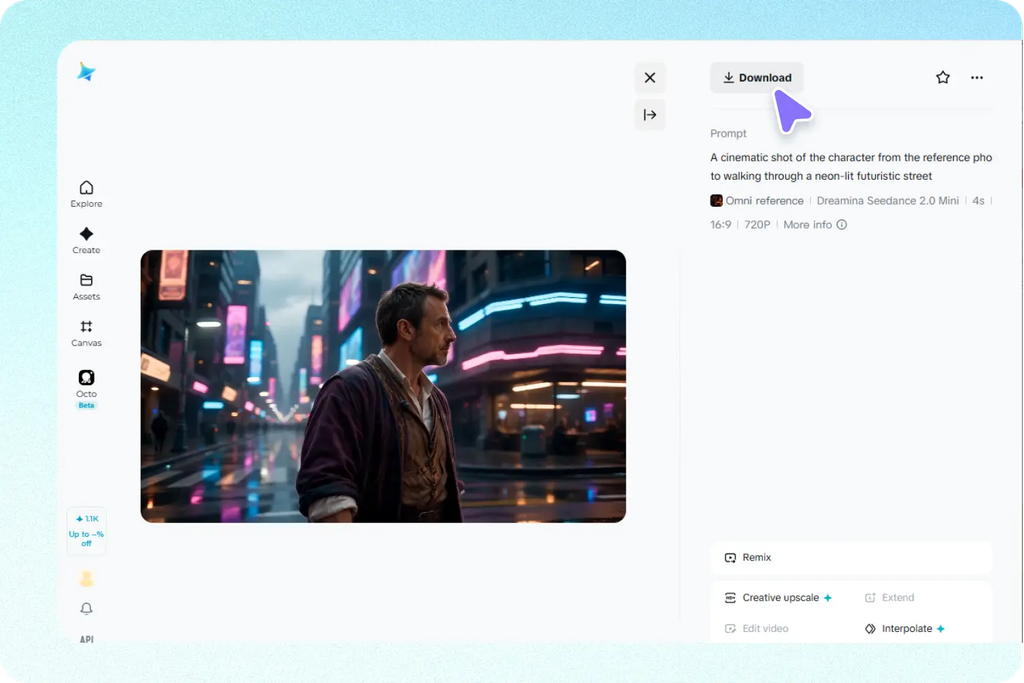
Creating a convincing AI video becomes considerably more difficult when a scene involves more than a subject standing in front of a static background. A cinematic sequence may require a character to perform a specific action while the camera changes position, the environment maintains its geometry, lighting remains coherent, and several visual references influence the final appearance at the same time. In conventional production these elements are handled through storyboards, blocking, camera planning, lighting setups, editing decisions, and repeated reviews. AI video generation compresses many of those decisions into a generation workflow, which means the quality of the result depends heavily on how clearly those relationships are communicated. Seedance 2.0 is designed around this kind of multimodal direction, allowing creators to combine written prompts with images, videos, and audio references rather than relying entirely on text. Its workflow supports up to 12 multimodal references consisting of images, videos, and audio while interpreting information related to appearance, movement, camera direction, editing style, and sound.
The difficult part is not simply telling an AI model what should appear in a shot. The real challenge is establishing which visual elements should remain stable and which elements are supposed to move or change. A character reference can establish identity, another image can define an environment, a video can communicate movement, and an audio reference can influence dialogue or timing. If these inputs are treated as unrelated assets, the resulting scene may lose consistency even when every individual instruction appears reasonable. A stronger approach is to treat the generation as a coordinated scene rather than a collection of visual ingredients. Camera movement needs to make sense relative to the character’s position, character actions need to fit the environment, and references need to reinforce rather than contradict one another. Seedance 2.0 specifically supports this type of multimodal workflow and is designed to preserve character identity, product details, scene composition, and connected visual elements across generated sequences.
This changes how creators should think about prompting complex cinematic scenes. Instead of writing an extremely long paragraph filled with disconnected adjectives, the better strategy is to describe the subject, action, environment, camera behavior, lighting, and visual style as connected production decisions. The camera should have a reason for moving, the character should have a clearly defined action, and references should have a specific purpose. This becomes particularly useful for short films, advertisements, music videos, product demonstrations, storyboards, and previsualization where the generated clip needs to communicate an intentional sequence rather than simply look attractive. Seedance 2.0 also supports image-to-video workflows that can preserve character identity and scene composition while adding movement, making reference selection an important part of the creative process rather than an optional extra.
Why Complex AI Scenes Require More Than a Detailed Prompt
A complex scene contains several layers of information that the model must interpret together. The first layer is the subject itself, including appearance, clothing, proportions, facial characteristics, or product geometry. The second is movement, which determines what the subject actually does during the shot. The third is the camera, including framing and movement through the environment. Then come lighting, color, atmosphere, background elements, and sound. When all of these are compressed into a single vague instruction, some parts can become less reliable because the model has to determine their relationship from limited context. A useful prompt therefore does more than describe what the viewer should see. It establishes the sequence of events and gives the generation a hierarchy of priorities.
This is why multimodal references can be more useful than endlessly expanding the written prompt. Seedance 2.0 allows creators to provide different types of reference material so that appearance, motion, camera ideas, and audio can be communicated through the format that represents them best. An image can show a character’s appearance more precisely than a paragraph can. A video can demonstrate movement more clearly than a sentence describing every body position. Audio can establish dialogue or sound cues that would otherwise be difficult to describe. The official workflow specifically recommends combining detailed prompts with multimodal references and defining the subject, action, environment, camera movement, lighting, and visual style before generation.
How Camera Direction Changes the Logic of a Scene
Camera movement should not be treated as decorative language added to make a prompt sound cinematic. A camera move changes what the audience sees and therefore changes how the action is perceived. A slow push toward a character creates a different visual relationship from a tracking shot that follows the character through an environment. A side movement can reveal spatial relationships while a rotating camera can expose details that were previously outside the frame. When directing an AI-generated scene, camera instructions become much more useful when they are connected to the action taking place at the same time.
For example, instead of simply asking for a cinematic camera movement, a stronger direction can establish that the camera begins with a wider view, follows the subject as they move through the environment, and gradually changes the framing as the important action occurs. This gives the model a temporal relationship between movement and framing. Seedance 2.0’s official workflow highlights camera movement as part of the prompt and supports multi-camera storytelling with connected scenes and natural shot transitions. The model can also interpret camera movement references, which makes a visual reference particularly valuable when the desired camera behavior is difficult to explain in words.
How Character Movement and Camera Motion Stay Connected
Character motion becomes difficult when the camera and subject appear to follow completely separate instructions. Imagine a character walking toward a doorway while the camera moves backward to maintain a medium shot. The subject’s speed, camera speed, distance, and environment all need to remain visually compatible. If the character moves too quickly while the camera behaves as if the subject were stationary, the scene can lose its natural rhythm. The same problem can appear when a character turns, reaches for an object, sits down, or interacts with another subject while the camera simultaneously changes angle.
The solution is to describe action as a sequence of meaningful beats rather than stacking unrelated movements together. First establish where the subject is positioned. Then explain the main action and how the camera responds to that action. If the character turns toward another person, for example, the camera can slowly reposition to reveal the interaction instead of performing an unrelated movement. This approach gives the model a stronger relationship between subject movement and camera behavior. Seedance 2.0’s reference-driven workflow is particularly relevant here because the system can use video references to guide motion while preserving important visual characteristics from image references.
Building a Reference Hierarchy for Difficult Cinematic Shots
One of the biggest mistakes in multimodal generation is assuming that adding more references automatically produces a better result. References are most useful when each one contributes specific information. If several images show completely different versions of the same character or environment without explaining their roles, the model has to resolve unnecessary conflicts. A better workflow is to decide which reference establishes identity, which establishes the environment, which communicates movement, and which defines the visual style. This makes the reference set function more like a production brief than a random collection of inspiration.
For complex scenes, creators can organize their reference material around a clear hierarchy:
- Character reference: Establishes the appearance and identity that should remain stable throughout the shot.
- Environment reference: Defines the location, spatial arrangement, architecture, or major background elements.
- Motion reference: Demonstrates the physical movement or performance that the generated character should follow.
- Camera reference: Communicates framing, movement, perspective, or the intended visual relationship between camera and subject.
- Style reference: Establishes lighting, color treatment, atmosphere, texture, or overall cinematic direction.
- Audio reference: Provides dialogue, narration, music, or sound cues that can influence timing and performance.
The purpose of this hierarchy is not to make prompting complicated for its own sake. It reduces ambiguity. Seedance 2.0 supports up to 12 multimodal references, including nine images, three videos, and three audio clips, giving creators enough input capacity to build a structured reference set for demanding scenes.
How Audio Can Influence Visual Timing
Audio is often treated as something that gets added after the visual generation, but synchronized sound can affect how a scene feels even when the primary goal is visual storytelling. Dialogue creates natural timing points because facial expressions and mouth movements need to correspond to spoken words. Sound effects can also reinforce physical actions such as footsteps, impacts, object movement, or environmental events. Music can establish pacing and emotional rhythm without necessarily dictating every camera decision.
Seedance 2.0 incorporates audio references into its multimodal workflow and is designed to synchronize narration, dialogue, sound effects, and visuals across connected scenes. Its official documentation also describes voice-style guidance and lip synchronization as part of the supported workflow. This means audio can be treated as another directional layer rather than a final production afterthought. When a scene contains dialogue or important sound cues, specifying their relationship to the action can help create a more coherent sequence.
Using Seedance 2.5 to Understand the Next Stage of AI Video Control

The development from short AI clips toward more controlled production workflows becomes especially visible when comparing newer model capabilities. Seedance 2.5 expands the multimodal approach with support for up to 50 references, longer continuous video generation, reference-to-video workflows, and localized editing. These capabilities matter because complex video production often fails for small reasons rather than one major mistake. A creator may like the composition but dislike one object, like the movement but need to change a localized detail, or want a longer sequence without breaking continuity. A workflow that allows targeted corrections can therefore be more useful than one that simply generates another complete clip.
The comparison also shows why the underlying production logic is moving toward more granular control. Seedance 2.5 supports multimodal inputs such as scripts, images, videos, audio, and style references, while its R2V workflow can use motion references to provide additional guidance. Its localized editing capability is designed for region-level changes and video cleanup without requiring the entire scene to be regenerated. For creators learning to direct Seedance 2.0 today, this broader direction is useful because it reinforces an important principle: better AI video results come from controlling individual production variables rather than asking the model to solve everything through one giant prompt.
How to Diagnose a Weak Generation Without Starting Over
When a generated scene looks wrong, rewriting the entire prompt is often an inefficient response. A better diagnostic process is to identify which layer failed. If the character looks inconsistent, examine the identity reference and determine whether the appearance was clearly established. If the movement is wrong, review the motion description and reference footage. If the scene feels visually confusing, inspect the environment and camera instructions. If the timing feels unnatural, look at the relationship between action, camera movement, and audio rather than changing the entire visual style.
This layer-by-layer approach makes iteration more predictable. A creator can change one major variable while keeping the others stable and then compare the result. That is closer to how professional visual production works because directors do not normally replace the entire creative concept whenever one shot needs adjustment. Seedance 2.0’s combination of multimodal references and adjustable generation settings supports this iterative mindset, while built-in enhancement tools such as Upscale and Interpolation can be used after generation when additional visual refinement is needed.
Turning Complex Scene Direction Into a Repeatable Workflow
A reliable workflow begins before the prompt is written. First define what the audience should understand from the shot. Then determine the subject, environment, action, camera behavior, lighting, and sound. After that, select only the references that contribute useful information to those decisions. This prevents the common problem of collecting dozens of attractive images without knowing what each one is supposed to communicate. The final prompt can then describe the scene as a coordinated sequence instead of a list of disconnected visual qualities.
Creators who want to explore Seedance 2.0 in a practical environment can use Dreamina to test different combinations of prompts and multimodal references while refining the same creative idea through multiple generations. The most useful mindset is to treat every generation as a production test rather than a final answer. Compare the result with the original brief, identify the layer that failed, adjust that layer, and generate again. This process makes experimentation more controlled and helps creators learn which references and instructions produce reliable results.
Final Thoughts
Complex cinematic AI video is ultimately a problem of coordination. A convincing shot is not created simply because the model knows how to generate a realistic character or an attractive environment. The character needs to occupy the correct space, the action needs to develop logically, the camera needs to respond to that action, and the visual references need to reinforce the intended identity and composition. When these elements are treated as connected production layers, the prompt becomes much more than a description. It becomes a compact directing brief that explains what should happen and how the different parts of the scene relate to one another.
Seedance 2.0 is particularly interesting in this context because its multimodal workflow gives creators several ways to communicate those decisions. Images can establish appearance and composition, videos can provide movement, audio can contribute timing and performance cues, and written prompts can connect those inputs into a single scene direction. The official workflow also emphasizes character consistency, camera movement, synchronized audio-visual elements, and multi-scene storytelling, making the platform relevant to creators who need more control than basic text-to-video generation provides.
The strongest results therefore come from thinking like a director rather than simply thinking like a prompt writer. Instead of asking for more adjectives, define relationships. Instead of uploading more references, assign each reference a purpose. Instead of regenerating an entire scene after every problem, identify the layer that failed and refine it. That shift from random prompting to structured scene direction is what makes complex AI video generation more repeatable and gives creators a stronger foundation for producing cinematic sequences.
FAQs
Can Seedance 2.0 use multiple types of references in one video?
Yes. Seedance 2.0 supports multimodal references including images, videos, and audio. Its official workflow allows up to 12 reference resources, consisting of up to nine photos, three videos, and three audio clips. These references can help communicate appearance, motion, camera ideas, scene information, and audio direction.
What should be included in a Seedance 2.0 prompt for a complex scene?
A strong prompt should explain the subject, action, environment, camera movement, lighting, mood, and visual style. For more complicated scenes, it is also useful to explain how the camera movement relates to the character’s action rather than describing both independently.
Can Seedance 2.0 preserve character identity?
Seedance 2.0 is designed to preserve character identity and other important visual details when using reference-driven workflows. The official documentation specifically describes maintaining characters, logos, outfits, geometry, lighting, and color palettes across sequences.
Why are video references useful for AI video generation?
A video reference can communicate movement more directly than written instructions. Instead of explaining every pose and transition in text, the reference can demonstrate the intended motion. This can be particularly useful for character performances, physical actions, camera behavior, or other sequences where timing matters.
How should camera movement be described?
Camera movement should be connected to the action. Explain where the camera begins, what it does during the important action, and how the framing changes. Avoid combining several unrelated camera movements unless the transition between them is clear.
Does audio matter when generating cinematic AI videos?
Yes. Dialogue, narration, sound effects, and music can contribute to the timing and structure of a scene. Seedance 2.0 supports audio references and is designed to synchronize audio with visual elements including dialogue and sound effects.
Is adding more references always better?
No. More references can introduce conflicting information if their roles are unclear. A smaller set of carefully selected references can be more effective when each one has a defined purpose such as character identity, environment, motion, camera direction, style, or audio.
What is the difference between Seedance 2.0 and newer Seedance workflows?
Seedance 2.0 focuses on multimodal 4K video generation with up to 12 references and supports cinematic scene creation, character consistency, camera movement, and synchronized audio-visual elements. Newer Seedance 2.5 workflows expand this approach with up to 50 multimodal references, longer video generation, reference-to-video controls, and localized editing.
How can creators improve a weak AI-generated scene?
Instead of rewriting everything, identify the failing layer. Check the character reference if identity is wrong, the motion reference if movement is incorrect, the camera direction if framing is inconsistent, and the timing or audio instructions if the sequence feels unnatural. Making targeted changes makes iteration more controlled.
Can Seedance 2.0 be used for professional video concepts?
Yes. The official Seedance 2.0 workflow is positioned for applications including short films, commercials, music videos, storytelling, product content, and previsualization. Its reference-based approach can be useful for creating visual concepts before committing to more extensive production work.