The most memorable homes are often defined by details that cannot be selected from a standard catalog. A custom house number, patterned privacy screen, engraved cabinet panel or carefully designed wall feature can give a space an identity that mass-produced décor rarely achieves.
Creating these elements once required a specialist workshop or a long chain of suppliers. Today, digital design software and compact fabrication tools are making small-scale customization more accessible to interior designers, independent makers and homeowners with properly equipped creative studios.
Laser cutting and engraving are an important part of this shift. They allow a digital drawing to become a repeatable physical object, whether the project involves wood, acrylic, coated metal or another compatible material.
The technology is only one part of the process, however. Successful results still depend on material selection, thoughtful design, safe operation, ventilation, assembly and finishing. The objective should not be to use a laser simply because it is available, but to create details that genuinely complement the home.
Bespoke Design Goes Beyond Custom Furniture
When people think about a bespoke interior, they often picture built-in cabinetry, made-to-measure furniture or a custom kitchen. Smaller components can be just as influential.
Personalized details may include:
- House numbers and entrance signs
- Decorative wall panels
- Cabinet and drawer inserts
- Patterned room dividers
- Custom lighting shades and screens
- Acrylic organizers and display stands
- Engraved storage labels
- Personalized coasters and serving accessories
- Family name signs
- Decorative frames and seasonal displays
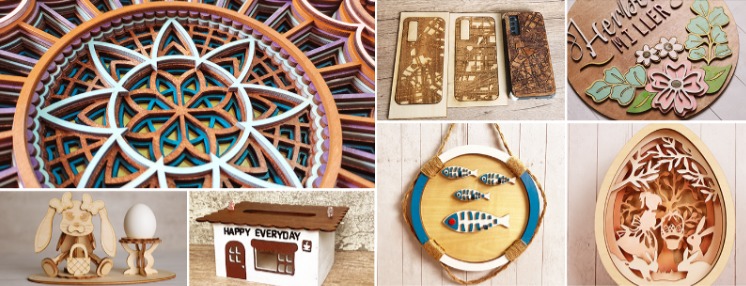
These objects help establish a consistent visual language throughout a home. A geometric pattern introduced at the entrance might reappear on a cabinet insert or decorative screen. A typeface used for a house number could also be applied to room labels or storage systems.
Digital fabrication makes this repetition easier because the same design file can be resized, adapted and reproduced. Customization therefore does not have to mean creating every object from the beginning.
The strongest designs usually exercise restraint. Filling every room with elaborate laser-cut patterns can make a home feel visually crowded. A smaller number of carefully placed pieces often has greater impact.
Digital Files Make Customization Repeatable
Most digitally fabricated projects begin as vector artwork. Unlike a standard photograph, a vector file describes lines and shapes that can be scaled without losing their definition.
Depending on the software and machine, common file formats may include SVG, DXF, AI or PDF. The basic workflow usually follows several stages:
- Develop the idea and measure the intended location.
- Create or prepare the vector design.
- Select a compatible material.
- Test the design on a small sample.
- Cut, engrave or mark the component.
- Clean, assemble and finish the parts.
- Check the final fit before installation.
Accurate measurements matter. A decorative panel may look attractive on a computer screen but fail to fit if the design does not allow for fixings, clearances or the thickness of surrounding materials.
Designers should also inspect files for overlapping lines, open contours and extremely small features. A machine follows the prepared path; it cannot automatically correct every design problem.
Making a sample is particularly useful when a component will interact with light. A perforated panel or patterned shade may cast shadows that are difficult to predict from a flat drawing. Testing a small section allows the spacing, scale and visual density to be adjusted before the complete piece is produced.
Materials Create Different Interior Effects
Material choice influences the appearance, durability and character of a finished object. It also determines which type of laser process may be suitable.
Wood
Wood introduces warmth and natural variation. It works well for wall décor, name signs, cabinet details, models, coasters and layered artwork.
Plywood and medium-density fiberboard are often used for prototyping and decorative work, while selected solid woods may provide a more refined finish. Results vary according to species, thickness, adhesive content and surface coating.
Laser processing may darken the cut edge or create smoke residue. Some designers use this contrast intentionally, while others sand or finish the surface after cutting.
Acrylic
Acrylic suits modern interiors because it is available in transparent, translucent, mirrored and colored finishes. It can be used for organizers, display structures, signage, decorative inserts and lighting-related components.
A clear acrylic edge may become an important visual feature, particularly in a minimalist setting. Protective film is often left in place during production to reduce scratches and residue, although the appropriate procedure depends on the material and equipment.
Acrylic should not be confused with every other clear plastic. Plastics respond differently to heat, and some are unsuitable or dangerous for laser processing.
Metal
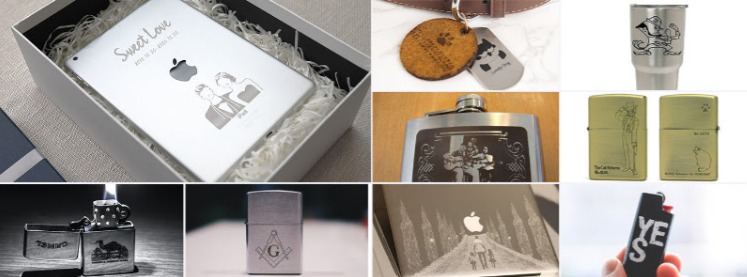
Metal can bring a refined, industrial or architectural character to an interior. Potential projects include engraved nameplates, cabinet labels, decorative inlays, house numbers and personalized hardware details.
Different processes may be required for cutting, surface marking and deep engraving. A low-power machine designed for wood is not automatically capable of producing the same results on stainless steel, aluminum or brass.
Leather and Coated Materials
Compatible leather and coated materials can be used for drawer pulls, desk accessories, storage labels and decorative inserts. Results depend on the material’s composition and finish.
Synthetic materials of unknown composition should never be processed without verification. Some materials release corrosive or hazardous fumes when heated.
Cutting, Engraving and Marking Serve Different Purposes
Although the terms are sometimes used interchangeably, cutting, engraving and marking describe different outcomes.
Cutting sends the laser through the material to create an outline, opening or separate component. It is useful for panels, letters, layered artwork and pieces intended for assembly.
Engraving removes material from the surface to create a recessed image, texture or line. The depth may vary according to the material, power and number of passes.
Marking changes the appearance of a surface without necessarily removing much material. It is commonly associated with permanent text, codes, logos and identification on compatible metals and plastics.
The suitable machine depends on the materials used most frequently. For makers whose projects primarily involve wood, acrylic, leather and similar non-metals, CO2 laser cutters and engravers are generally a more relevant category to evaluate than fiber systems designed around metal applications.
The decision should begin with the intended work rather than the most impressive specification. A machine selected for wooden wall décor and acrylic organizers may be very different from one intended for permanent metal marking or cutting metal components.
Multi-Material Work Requires Careful Equipment Selection
Interior projects often combine several materials. A house number may use an acrylic face with a metal backing. A decorative light could combine cut wood with a translucent diffuser. A display object may require engraved metal alongside precisely cut non-metal parts.
No single laser source is automatically ideal for all these materials. CO₂ systems are commonly associated with non-metals such as wood and acrylic, while fiber systems are used for compatible metal cutting, marking and engraving applications. Diode and UV lasers occupy different process ranges again.
For studios that regularly move between metal and non-metal projects, a desktop dual-laser cutting system can reduce the need to organize completely separate workflows. The Gweike Cloud MCore, for example, combines fiber and CO₂ capabilities in one desktop-format platform.
That does not mean every material can be processed with one setting or without testing. Users must still confirm:
- Whether the material is compatible with the relevant laser
- Maximum dimensions and thickness
- Required power and processing speed
- Workholding method
- Extraction requirements
- Edge or surface quality
- Fire and fume risks
- Maintenance needs
Before selecting a Gweike Cloud system or any comparable machine, buyers should list the materials and project sizes they expect to handle most often. Features that look useful in a demonstration may add little value if they do not support the studio’s real work.
The Workspace Matters as Much as the Machine
Calling a laser system “desktop” does not mean it can be placed anywhere in a home. It requires a planned workspace and appropriate safety controls.
A suitable location should provide:
- A stable, non-combustible supporting surface
- Adequate clearance around the equipment
- Proper exhaust or filtration
- Safe electrical supply
- Organized material storage
- Controlled access
- Suitable fire-extinguishing equipment
- Space for cleaning and maintenance
- Separation from ordinary living areas where appropriate
Smoke and fumes must not be allowed to accumulate inside the home. Exhaust arrangements should follow the machine manufacturer’s instructions and applicable local requirements. Recirculating filtration and external venting are not interchangeable in every situation.
Children, pets and untrained household members should not have access to the operating area. The machine should not be left running without appropriate supervision, even when a project has worked successfully before.
The condition of the material also matters. Warped sheets, unstable parts and dirty surfaces can affect results. Small scraps should be removed regularly so they do not become an additional fire risk.
An organized studio is not merely more attractive. It makes material handling, inspection and emergency response more manageable.
Finishing Turns Cut Parts Into Interior Objects
A laser may produce the main shape, but finishing determines whether the result looks like a polished interior object or an unfinished workshop sample.
Depending on the project, finishing may include:
- Removing residue
- Sanding darkened wood edges
- Applying oil, wax, paint or sealant
- Cleaning acrylic surfaces
- Deburring metal
- Adding spacers, hinges or mounting hardware
- Bonding layered components
- Installing backlighting
- Checking sharp edges
- Testing the completed assembly
The finishing process should be considered during design. If a wooden panel will be painted, the grain and surface condition may matter less than on a naturally finished piece. If an acrylic component will be illuminated from the edge, scratches and adhesive marks may become highly visible.
Fastening methods also influence appearance. Visible screws can reinforce an industrial style, while concealed fittings may suit a quieter, more minimal interior. Removable connections are helpful when a feature may require cleaning, access or replacement.
For wall-mounted objects, weight and mounting conditions must be evaluated. Decorative components should be installed using fittings appropriate for the wall construction and the finished load.
Design for the Home, Not for the Tool
Access to digital fabrication can encourage unnecessary complexity. Intricate patterns are easy to draw and impressive to watch during production, but they do not always improve a room.
A successful piece should respond to its surroundings. Consider:
- The scale of the room
- Existing materials and colors
- Viewing distance
- Natural and artificial light
- Cleaning requirements
- Touch and interaction
- Visual contrast
- Long-term maintenance
A dense pattern may work well as a small cabinet insert but become overwhelming across an entire wall. Fine engraving may look beautiful at close range yet disappear when placed above eye level. Highly reflective acrylic may suit a display area but create distracting glare beside a window.
Digital tools expand what can be made. Design judgment determines what should be made.
Prototyping Helps Avoid Expensive Mistakes
One of the greatest advantages of an in-house digital workflow is the ability to test an idea before producing the final object.
A prototype can answer practical questions:
- Does the size feel appropriate in the room?
- Is the pattern too dense?
- Are small elements strong enough?
- Does the material match nearby finishes?
- Are mounting holes positioned correctly?
- Does engraved text remain readable?
- How does light interact with the surface?
- Is assembly straightforward?
The test does not always need to use the final material. An inexpensive sample can help verify dimensions and proportion before a premium sheet is processed.
Once the design is approved, the digital file also makes replacement or repetition easier. Matching labels, signs or decorative components can be produced later without manually recreating the original pattern.
Final Thoughts
Desktop digital fabrication is giving designers, makers and properly equipped home studios more control over bespoke interior details. It can transform digital drawings into signs, screens, organizers, decorative panels and personalized objects that respond to a specific room or household.
The technology is most valuable when it supports a thoughtful design process. Material compatibility, equipment selection, ventilation, safety, assembly and finishing all shape the final result.
A laser cutter does not replace good taste or careful planning. What it offers is a flexible bridge between an idea and a physical object. When that flexibility is used with restraint, even a small custom detail can make a modern home feel more personal, coherent and genuinely one of a kind.