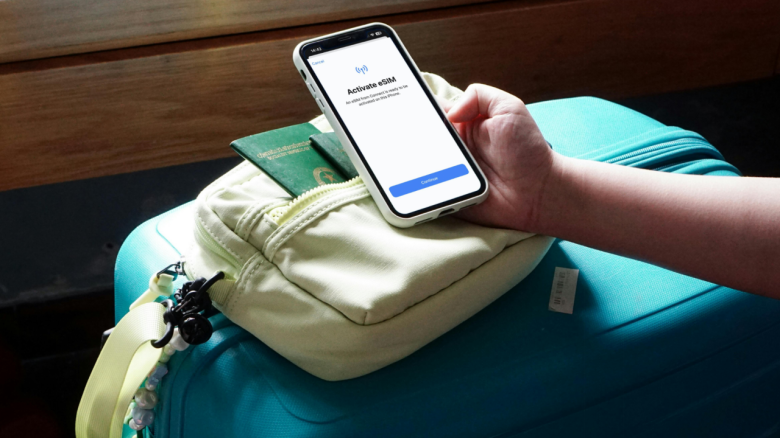
This is the scenario you have to consider: You have arrived in a foreign country; your Airbnb host is waiting for you on the phone, and your mobile is only useful for calls. Without a map, email confirmations, and no replies, this is a very sad picture that tourists often experience while abroad.
Luckily for all travelers, you can avoid experiencing such trouble. As seen in Travel Report 2026, as many as 86.7% of tourists have encountered mobile internet issues while traveling abroad, but this is good news. Most of the issues can be prevented if we are aware of them. The only countries where travelers have found a solution are in European countries, where they are using multi-country roaming plans instead of buying a SIM card at customs points.
Telefy is one of the services that offers data roaming for over 45+ countries in Europe with a bundle including real data and SMS messages as well as phone calls. You buy the plan before flying. It is all set up and done! So here is a rundown of the 9 mistakes that may ruin your connectivity:
The Connectivity Mistakes Quietly Wrecking Your Trip
1. Let Background Applications Exhaust Your Data While You Sleep
You may be wondering, ‘How could I have known?’ This issue is frustrating precisely because it often happens silently in the background. Applications on your device can begin syncing automatically as soon as you connect to an internet network.
While being connected to the internet, go to your settings application, disable the background application refresh, stop auto-updates, and set your cloud backup to only update when connected to WiFi. The change may take as little as five minutes to make, but it may be crucial to saving your trip from frustration. This is one of those international travel connectivity tips that are very tedious, but are worth every bit of it.
2. Forget To Enable Data Roaming Or Pick Wrong Sim Card Number
This may leave your mobile signal bars full, but only display that your device has not yet registered in the roaming network. It is truly one of the worst invisible issues faced while traveling internationally.
Dual-SIM users, listen up: your device might be defaulting to your home carrier line rather than your travel plan. Before boarding, confirm which line handles mobile data. If you’re using eSIM Europe, set it as your primary data line and make sure roaming is explicitly enabled for it. Seriously, verify this, don’t just assume.
3. Buying a one-country eSIM for a multi-country trip
Let us imagine: you are visiting multiple countries for 10 days, but you bought a French-only package. You have now made a costly mistake. The biggest connectivity error you will make when traveling internationally is thinking coverage is ubiquitous throughout the continent, but a lot of cheap plans only have a very limited range (e.g., two to three countries).
Make sure the plan you purchase is one that covers over 40+ countries in Europe and not an individual per-country limit. Don’t scan over the coverage map.
4. Falling For The “Unlimited Data” Plan That Secretly Drains Your Cash
Although the promise of “unlimited data” might tempt you, it comes at a cost. Many services will offer unlimited data, but this often means they will cut your speeds down to a mere 64 Kbps after you consume your first gigabyte.
Suddenly, your map will stop working, and your video calls will become so blurry that you won’t know who you’re calling, but it is still unlimited data. One of the most practical international travel connectivity tips: read the fair-use policy before you buy anything.
Determine your throttle speed precisely, identify your threshold, and consider whether it suits your travel pattern. If you use the service frequently, the limited but fast internet package is preferable to the unlimited and throttled package.
5. Believing Your Esim Will Automatically Work After You Land
Activation failure may occur, but the provider does not clearly tell you that. You buy a SIM card in your hometown, you get on the plane, and when you land, it is no longer working for you, as you did not register any support number.
When this happens, the situation could be very overwhelming. Make sure you buy your plan from a provider that will give you 24/7 live chat support and test it beforehand. Don’t forget to turn off your WiFi connection as well.
6. Reliance On Public Wi-Fi Networks
The public airport/hotel WiFi or the one offered in the cute café near the cathedral looks like a great way to stay connected if you’ve run out of mobile data. Unfortunately, this is also wrong.
You put all your passwords and bank details at risk of being intercepted while you use public WiFi. Additionally, public WiFi is unreliable as it leads to disconnects and fluctuating speeds. It’s possibly the worst you could possibly do while traveling.
7. Confusing “Good Signal” With “Internet”
The signal bar just represents that a tower has been found, but not necessarily that it’s relaying data to the Internet. Incorrect APN configuration, DNS problems, or captive portals could all lead to the signal bar working, but there’s no connection.
Don’t panic; enable and disable airplane mode, double-check the APN configuration, temporarily disable any VPN, and open your web browser to find a captive portal.
8. Not Downloading Essential Offline Components Prior To Your Departure
It’s one of those tips that are too simple, but many travelers forget to execute them. Download your offline maps. Download your translation packs. Download movies you want to watch while on the plane; download them before you depart on your home WiFi connection. These connectivity tips for international travel would be a lifesaver throughout your journey.
9. Failing To Track Your Data Until You Are Almost Out
Traveling makes travelers aware they are almost out of data on the 6th day. Apple devices like the iPhone and Android mobile phones now enable travelers to track their data on a per-application basis and set their daily alert preferences.
You need to take advantage of those services. You could turn on low data mode or data saver for the applications you use more often, and even download AI applications that would monitor the data for you. Set reminders on the data dashboard once a week, and save your travel connectivity issues.
Quick solutions for signal problems
If you have a signal but no connection, the best solution is the following sequence of actions: put your phone in airplane mode and back on, verify that your roaming is enabled, adjust your APN settings, disable your VPN connection for a short time, and then open a new web page.
If none of the previous solutions work for you, it’s time to prepare an emergency kit: a portable router, a local SIM card that you can purchase at the airport of your destination, and a USB-C hub so you can charge your phone and use it for tethering simultaneously.
Ensure your device has enough battery life: Having Internet access won’t help you if your phone is dead. Pack a power bank of at least 20,000 mAh capacity, take appropriate plug adapters for your destination country, and use airplane mode when the signal is lost – it helps to register on the network again.
What to Do Before You Even Pack Your Bag
Once you’ve confirmed that, loading up an eSIM Europe multi-country plan from a provider like Telefy is genuinely the smoothest connectivity setup available for European travel.
Compare Your Options Honestly
| Plan Type | Coverage | Typical Cost | Voice/SMS | Best For |
| Home Carrier Roaming | Global (limited) | High | Yes | Casual users |
| Local SIM | Single country | Low | Yes | Long stays |
| Global eSIM | Worldwide | Medium | Data-only | Multi-region trips |
| eSIM Europe | 40+ countries | Medium-low | Yes (some plans) | European travel |
Actually Test Your Setup Before You Leave
Install your eSIM at home. Turn off Wi-Fi. Confirm data is flowing. Then, many providers require a device restart to finalize the profile. Catching activation problems in your living room is a very different experience from troubleshooting them at a foreign airport at 11 PM.
The Bottom Line
See, there really isn’t much that’s complex about staying connected abroad, only what you do, with careful consideration. Correct the setup, pick the plan that works best for you, load your offline features, and test it all out before you jet off.
The nine problems we’ve highlighted aren’t technological bugs; they’re the result of common, preventable oversights. Pair an eSIM Europe plan with the knowledge gained here about troubleshooting, and you’ll be too busy living it up at your destination to be on the constant, frustrating search for a cafe with free WiFi.
Frequently Asked Questions
1. Can I continue to use my original WhatsApp number when using my travel eSIM?
Yes. The majority of phones support a system where you can continue to use your original WhatsApp number even while your mobile data is running off a travel eSIM. What’s important is not to uninstall and reinstall the WhatsApp application during your trip, as it may require an SMS verification.
2. Should I install my travel eSIM before or upon arrival?
Install your travel eSIM before you depart the country, and activate it only when directed by the plan instructions. Some plans activate when the plan is installed, whilst others only activate when connected to a local network at your destination. Consult the instructions of your chosen plan first!
3. My phone is carrier locked. Is a travel eSIM for me?
A carrier-locked phone may deny installation of local SIM cards and also travel eSIM cards even if the plan has been activated. Contact your phone carrier to check if your phone is carrier-locked before you purchase a travel eSIM plan. If so, you will either need to ask your carrier to unlock the phone or consider a roaming plan from your original carrier.
Visit: India Post Tracking